Optuma Desktop

Revolutionise your analysis with cutting-edge software

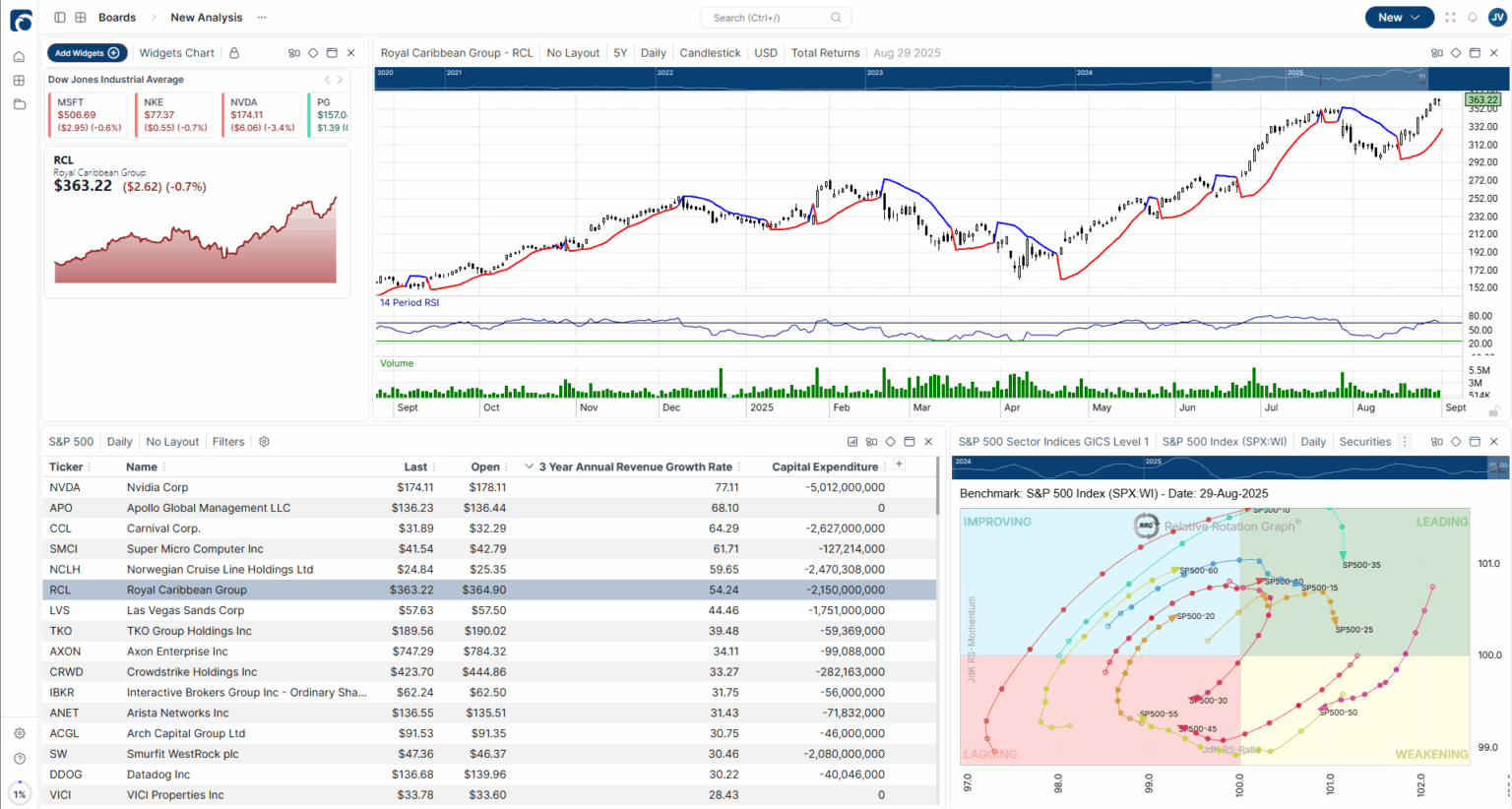
Optuma Desktop showing a multi-pane chart workspace with technical indicators, scans, and watchlists.

What is Optuma Desktop?

Optuma Desktop is your ultimate solution for advanced financial and technical analysis. Tailored to meet the needs of traders and analysts seeking professional charting software, Optuma Desktop empowers you to excel in the market.

Why choose Optuma Desktop?

  • Streamline and enhance your workflow, simplifying complex tasks
  • Accelerate your research and trading processes with unparalleled technology
  • Gain access to a comprehensive suite of advanced charts, indicators, and alerts
  • Benefit from the number one support team in the industry
  • Cater to users of all levels with a platform designed for everyone

Optuma Desktop is built to be your single solution for financial analysis. It's the go-to program for market professionals, serving buy- and sell-side analysts, portfolio managers, Wall Street departments, and professionally minded private traders.

Optuma continues to blow me away. Feature after feature astounds me…i.e. the ability to highlight numerous tools/lines/etc and make it a quick button up top is crazy. Multi time frame analysis with different periods/averages on the same chart… multi currency – wow. Flexibility to deal with multiple markets at the same time…. you guys don't need to give me more reasons to love this thing!

David Cox
CFA, CMT, FCSI, FMA, BMath
Portfolio Manager, CIBC Wood Gundy

Optuma Desktop's Key Features

Optuma Desktop's single-security charts give you direct control over every dimension of price action. Adjust the timeframe, scroll through full history, and layer indicators on any chart in a single click.

  • All standard charts
  • Swing and seasonality charts
  • Simple/logical design – maximum control
Optuma Desktop single-security chart showing price action with overlaid indicators and a custom timeframe.

Built to help you review and rank multiple securities at once. Optuma Desktop offers advanced chart types, many not found anywhere else, that group securities into baskets and compare their performance side by side, turning your dashboard into business intelligence rather than single-symbol analysis.

  • Bubble Charts
  • Column Charts
  • Scatter Plots
  • Relative Rotation Graphs
Optuma Desktop dashboard with bubble charts, scatter plots, and a relative rotation graph comparing a basket of securities.

Your tool to unlock the full power of Optuma Desktop.

Optuma Desktop scripts are built to be as simple as Excel formulas, so you don't need any coding knowledge. Yet they are powerful enough for you to explore any idea.

Take a look at our scripting training videos to start implementing scripts in your process.

Optuma Desktop scripting editor with a custom indicator formula and the resulting chart preview.

The premier Technical Analysis software solution built for you. No matter how you approach the market, Optuma Desktop has the most advanced tools for you. Optuma Desktop comes with all the standard indicators you would expect: RSI, Stochastics, Averages, Oscillators, MACDs, and a whole lot more.

Optuma Desktop chart with RSI, stochastic, MACD, and moving-average indicators stacked beneath the price pane.

Use the Scanning Manager to quickly search through thousands of securities and short-list those matching your criteria. If you link that scan to a Watchlist, it runs automatically every time you open the Watchlist. There is no easier way to keep your eye on the whole market.

Optuma Desktop Scanning Manager filtering thousands of securities into a Watchlist that updates automatically.

Have you ever waited for a security to break through an angled trend line? Or a particular level on an indicator? Optuma Desktop does this with ease. Once you identify your alerts, Optuma Desktop keeps monitoring them, using end-of-day or real-time data, and lets you know when they are triggered.

Optuma Desktop alerts panel with conditional triggers on trend lines, indicator levels, and end-of-day data.

Get help from experts when you need it. Our team has over 45 years of combined experience supporting industry professionals. They're friendly, responsive, and knowledgeable, with timely answers you can trust.

  • Available to all customers
  • Experts in the software and the application of every tool
  • Prompt responses and clear advice

Our team has built a comprehensive library of the questions, issues, and solutions our users have encountered. The Knowledge Base covers every indicator, chart, alert, and feature in depth, making it easy to learn new techniques without leaving the platform.

Start your free trial today

The possibilities are endless. Simplify your process. Increase your confidence.

Trial Now

FAQs

Optuma Desktop is for experienced private traders, professionals, and enterprises wanting a platform for advanced financial and technical analysis. If you are just starting out and simply need moving averages and a few indicators, Optuma Desktop may not be the best program for you. Call our support team to discuss your needs.

Optuma Desktop is a sophisticated financial tool that requires a certain level of mastery. Our team developed several resources to assist you in getting started with Optuma Desktop. Upon signing up for a trial or purchasing Optuma Desktop, every user receives a welcome email series with videos on getting started. In addition, we offer free courses on advanced Optuma Desktop features and tools on learn.optuma.com. To quickly find answers to any question you may have, Optuma Desktop's knowledge base contains written breakdowns of all tools, features, and processes. If you require more personalised assistance, you may schedule a consultation call with one of our experts.

Optuma Desktop is Windows software. Many Mac users run it inside a Windows virtual machine such as Parallels Desktop; it is not a native macOS application.

Optuma Desktop has many different tools you can add on to whichever plan you select. To see a full list of Optuma Desktop's tools check out our knowledge base.

Choose which categories of cookies you allow. Strictly-necessary cookies are always on. You can change this any time via the "Cookie Settings" link in the footer.

  • Functional

    Remember preferences like dismissed banners and your dark-mode choice.

  • Analytics

    Help us understand how the site is used so we can improve it.

  • Marketing

    Measure our advertising and help us reach people who may be interested in Optuma.